

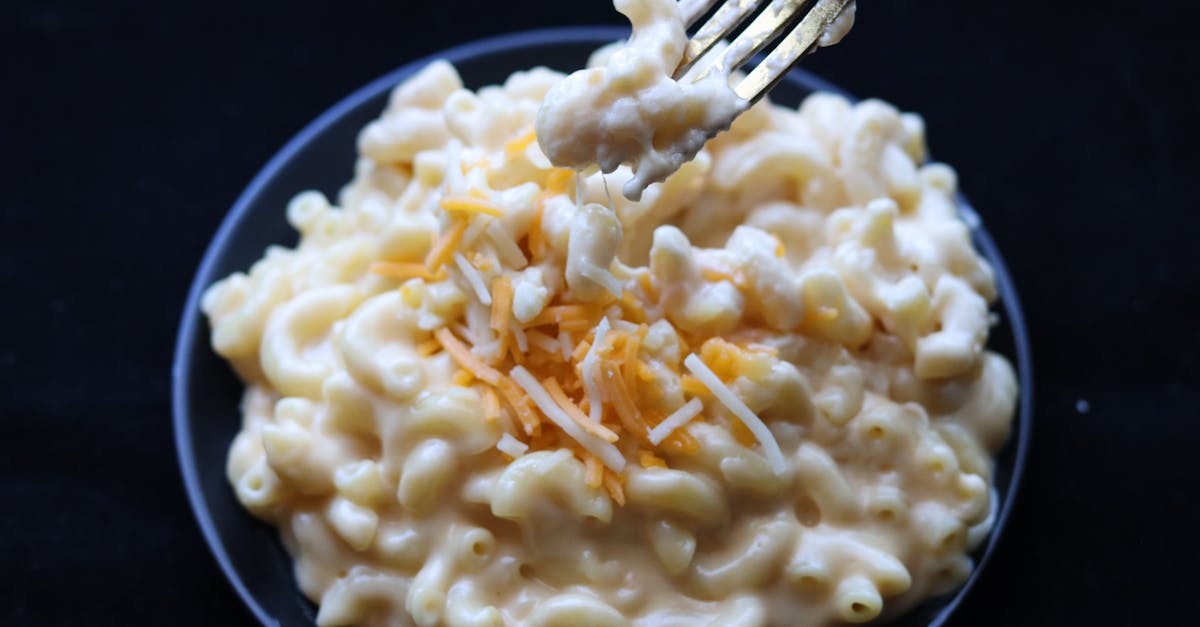
 Photo by Barbara G via Pexels
Dish photography guide
Mac and Cheese Food Photography: Angles, Lighting & AI Editing (2026)
Mac and Cheese food photography: the best angles, lighting, and AI editing workflow to turn a real phone shot into a menu-ready mac and cheese photo for delivery apps, websites, Google Business Profile, and printed menus.
Quick answer
For Mac and Cheese, start with a 45 Degree angle, use warm lighting for comfort food appeal. show creamy, cheesy texture. Then enhance the real photo with FoodPhoto.ai for clean crop, color, relighting, and background cleanup without changing the dish.
- Best angle: 45 Degree
- Other useful angles: 45 Degree and Close Up
- Category: Sides
- Cuisines: American
- Recommended presets: Steaming Fresh, Vibrant Commercial, Rustic and Doordash
Why Mac and Cheese needs a dish-specific photo workflow
Mac and Cheese sits in the sides category and appears across 1 cuisine (American). Show creamy cheese sauce coating pasta. Breadcrumb topping if baked. Steam. Spoon or fork lifting cheesy bite.
A generic restaurant photo process often misses the details that make mac and cheese sell: the texture, sauce gloss, color balance, crop, and the part of the dish customers recognize first. FoodPhoto.ai is built for real restaurant operators who need consistent menu images from phone photos, not fabricated food that disappoints customers.
Best angles for Mac and Cheese
The angles that sell mac and cheese fastest on a menu thumbnail are the ones that show the key details. Lead with a 45 Degree shot, then use alternates when you need variety across a category page, delivery app gallery, social post, or printed menu.
- 45 Degree: Use for mac and cheese hero shots, platform thumbnails, and menu cards when that crop best shows the dish structure.
- Close Up: Use for mac and cheese hero shots, platform thumbnails, and menu cards when that crop best shows the dish structure.
Lighting for Mac and Cheese
Warm lighting for comfort food appeal. Show creamy, cheesy texture. The practical target is a bright, appetizing image that still looks like the real mac and cheese: readable shadows, controlled highlights, accurate color, and no fake ingredients. If the kitchen light is mixed or harsh, shoot near a window or use a simple continuous light, then correct the final image in the editor.
AI editing workflow for Mac and Cheese
Shoot your real mac and cheese, upload it to FoodPhoto.ai, and use the recommended presets for this dish: Steaming Fresh, Vibrant Commercial, Rustic and Doordash. The editor improves relighting, background cleanup, crop, color, and texture consistency so the same source photo can be used for DoorDash, Uber Eats, Grubhub, Google Business Profile, a website menu, and a printed menu.
The important trust rule is simple: enhance the real image, do not change the dish. The photo should make the mac and cheese easier to understand and more appetizing, while preserving ingredients, portion size, and presentation.
Mac and Cheese for delivery apps and menus
On delivery apps, the thumbnail is often what earns the tap before a customer reads the description. Because Mac and Cheese belongs to American cooking, keep styling consistent with guest expectations: accurate color, clean background, and a crop that shows the dish clearly at small size.
Export a square crop for app listings, a wider hero image for your own website, and a social crop for campaigns. That one disciplined workflow keeps the full menu visually consistent without booking a new shoot for every special.
Frequently asked questions
What's the best angle to photograph Mac and Cheese?
Lead with a 45 Degree shot of mac and cheese. Show creamy cheese sauce coating pasta. Breadcrumb topping if baked. Steam. Spoon or fork lifting cheesy bite. Keep Close Up as alternates so the menu set has variety.
How should I light Mac and Cheese?
Warm lighting for comfort food appeal. Show creamy, cheesy texture. The goal is even, appetizing light that shows the real texture and color of the mac and cheese without flat shadows or harsh glare.
Can AI edit my Mac and Cheese phone photo?
Yes. Upload a real mac and cheese photo and FoodPhoto.ai handles relighting, background cleanup, color correction and crop. It enhances the existing image without changing the food, ingredients, or portion.
What background works for Mac and Cheese?
Use a clean surface, props that fit American presentation, and enough margin for square and landscape crops. Busy backgrounds are harder to read in DoorDash, Uber Eats, and Grubhub thumbnails.
How do I make Mac and Cheese photos for delivery apps?
Shoot mac and cheese at the 45 Degree angle with the lighting above, run the real photo through FoodPhoto.ai, and export a clean square image for listings plus a wider crop for your website and Google Business Profile.
Related resources
- All dish photography guides - Browse the restored dish-by-dish photo library.
- FoodPhoto.ai pricing - Start with paid credits for real menu photo enhancement.
- Delivery platform photo specs - DoorDash, Uber Eats, Grubhub and international platform requirements.
- French Fries food photography - Show golden, crispy texture. Pile or in basket/cone. Salt visible. Ketchup or dipping sauce. Steam if hot.
- Mashed Potatoes food photography - Show creamy texture, butter pool on top, gravy optional. Swirl or peak for interest. Garnish with chives or parsley.
- Onion Rings food photography - Stack showing rings, golden batter. Show crispiness. Dipping sauce. Break one open to show onion inside.
- Coleslaw food photography - Show fresh, crisp vegetables. Creamy or vinegar-based dressing. Colorful - purple and green cabbage, carrots.
- Phone Food Photography Guide - Related FoodPhoto.ai operator guide.
- Delivery App Photo QA Checklist - Related FoodPhoto.ai operator guide.
- Restaurant Photo Style Guide - Related FoodPhoto.ai operator guide.
Ready to produce menu-ready mac and cheese photos?
Use FoodPhoto.ai to turn real phone shots into consistent, paid-credit menu photos for delivery apps, websites, and campaigns.