Restaurant Flyer Maker
The Restaurant Flyer Maker turns a real dish photo into a clean promotional flyer or discount banner — built for offers, openings, and print or social distribution.
Built inside FoodPhoto.ai Studio (marketing mode): upload a real dish photo, pick a preset, and the AI does the styling. Start in FoodPhoto.ai Studio, browse every preset on the Marketing Studio hub, or compare plans on pricing.
Preset previews
These are real FoodPhoto.ai marketing presets. Each one starts from your photo and restyles it for the use case below.
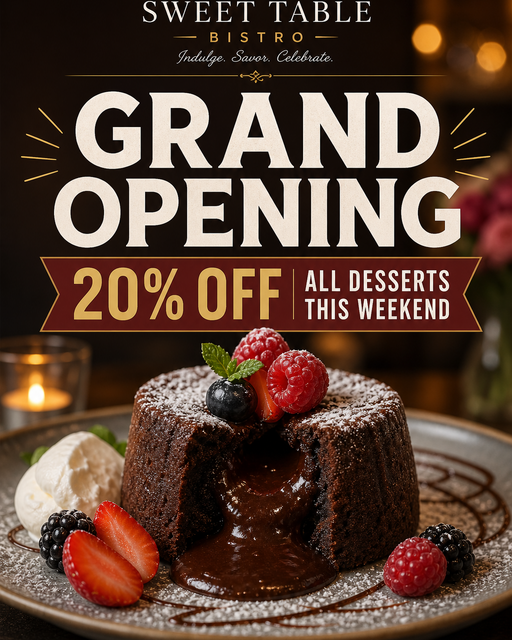
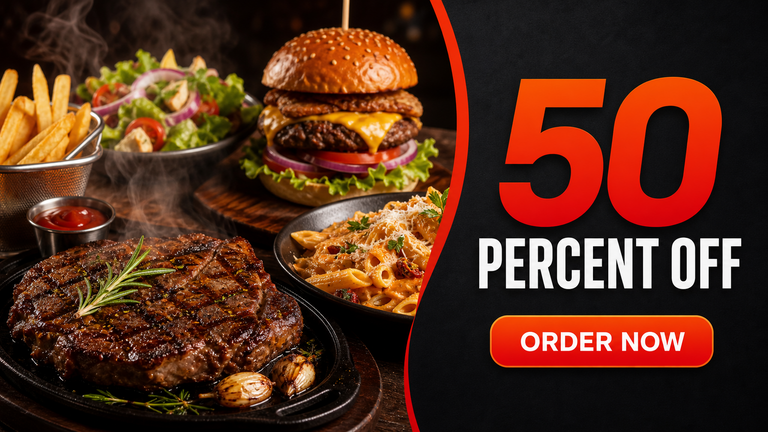
What this maker creates
- Choose flyer for a flexible promotional layout or discount_banner for a percent-off or deal banner, each with space for your headline and details.
- The maker restyles your real dish into an appetizing hero while keeping the food honest.
- Outputs work for social posts and for printed flyers, posters, and table inserts.
When restaurants use it
- Promoting a discount, coupon, or limited deal.
- Distributing a printed flyer in the neighborhood or in delivery bags.
- Spinning up a quick promo when you have a dish photo but no designer.
Independent restaurants that run print and social flyers and need fast, food-accurate promo creative. Broad commercial 'flyer maker' intent applied to restaurants specifically.
How to make it in the Studio
- Open FoodPhoto.ai Studio and upload a clear photo of your real dish or drink.
- Switch to the marketing presets and select the preset shown above.
- Generate a few options and keep the one that still matches what you serve.
- Add your headline, price, or date in the open space, then export for the channel you need.
The presets are included with paid credits: Starter is $15/mo for 50 credits, and the one-time Menu Test Pack is $10 for 10 credits. One credit makes one finished image.
Related makers
- Food Special & Limited-Time Offer Graphic Maker
- Catering Promo Maker for Restaurants
- Grand Opening & Event Promo Maker for Restaurants
- All marketing makers (hub)
- Food photography styles
Frequently asked questions
How do I make a restaurant flyer?
Upload a real dish photo in FoodPhoto.ai Studio, open the marketing presets, choose Flyer or Discount Banner, and the AI builds a promotional graphic with space for your headline and offer. Add your text and export.
Can I make a discount banner?
Yes. The Discount Banner preset is built for percent-off and deal messaging with a clear space for the offer.
Is it print-ready?
The graphics suit both social posts and small printed pieces like flyers, posters, and inserts.
What does it cost?
Starter is $15/mo for 50 credits; the one-time Menu Test Pack is $10 for 10 credits. One credit makes one image.
Make your Restaurant Flyer graphic
Open FoodPhoto.ai Studio, upload a real photo, and apply the preset. Start with the Menu Test Pack to try it on a few items before committing to a plan.