

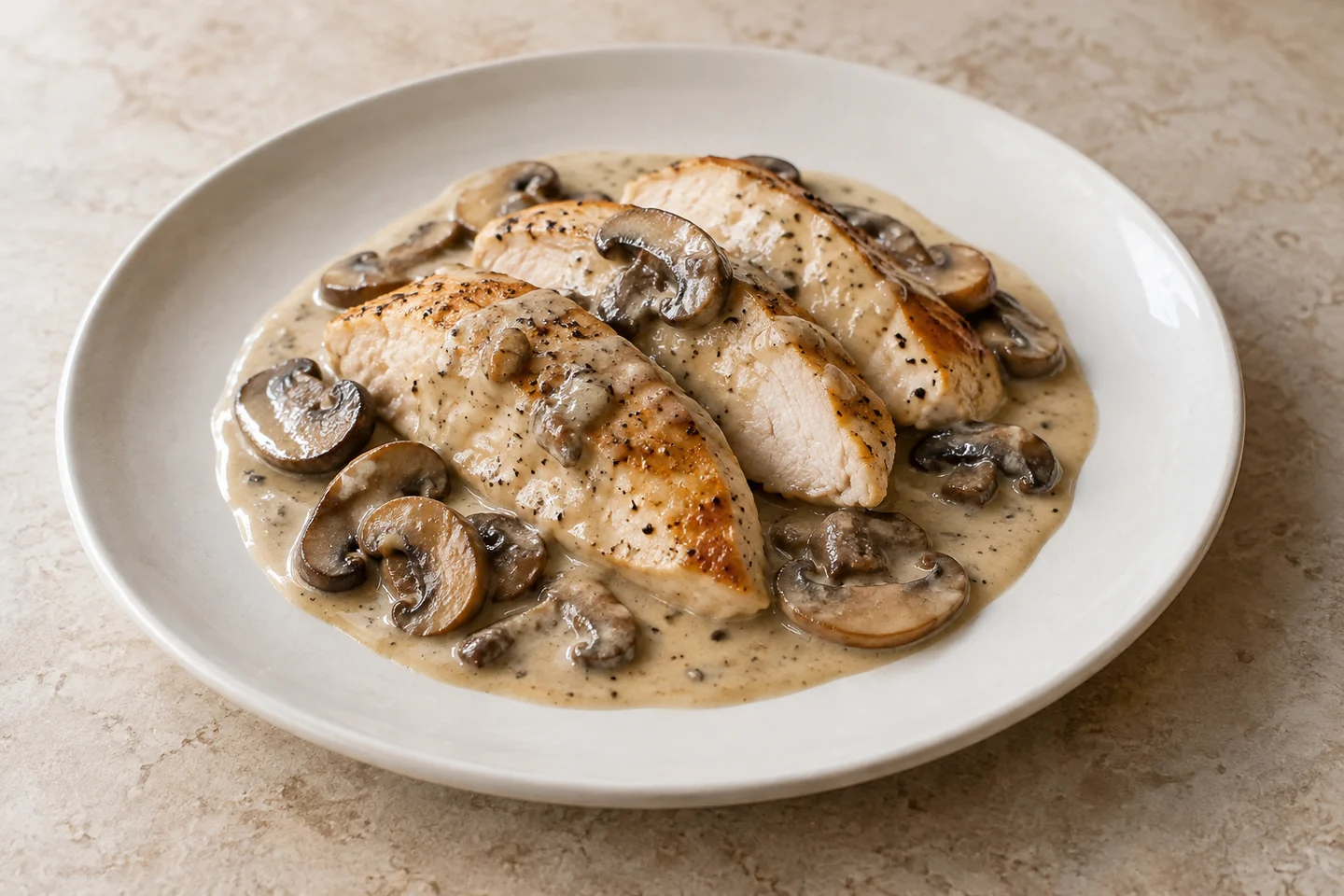
A sauce can look glossy without looking believable. When every surface shines with the same smooth highlight, the picture starts to describe a coating rather than food. Adding more detail to the prompt is not always the useful next move. First decide what the sauce is supposed to be doing.
Is it a thin dressing that collects between leaves? A thick glaze that clings to a piece of chicken? A cream sauce with a soft surface and small interruptions? Those are different visual problems. Treating all three as «make it appetizing» leaves too much unspecified.
This guide gives you a review process for an AI-assisted restaurant image. It does not report a controlled model comparison, and the example brief below is illustrative.
Start with the actual dish
Use a real reference photo of the dish you sell whenever possible. Write down three things that must survive the edit: the portion, the visible ingredients and the way the sauce sits on the food. A better-looking photograph should not quietly become a different order.
For this example, imagine chicken with a light mushroom cream sauce. The goal is to improve the presentation while keeping the chicken pieces, mushroom slices and serving size unchanged. You are not asking for extra mushrooms, a larger portion or decorative ingredients the kitchen does not use.
Review three small areas before judging the whole image
Where the sauce meets the food. Look for a boundary that makes sense. Is sauce sitting on the chicken, or does it appear fused into its surface? Does the edge repeat the same shape around every piece? Check against your reference rather than a general idea of what «delicious» looks like.
Where the light appears. A reflection can be useful, but a single unbroken white band across several unrelated ingredients deserves a closer look. Ask whether the mushrooms, meat and sauce have all acquired the same finish. The point is not to eliminate shine. It is to preserve the distinctions you can see in the actual dish.
Where the sauce rests on the plate. Review the puddle, streak or spooned edge at full size. Look for accidental extra food, a texture that turns into plate decoration, or an edge that disappears without a clear reason. Then view the whole photograph at the small size a customer will actually see.
These checks are prompts for human inspection. They are not automatic proof that an image is accurate.
A reusable edit brief
Replace the bracketed fields before using this prompt with an image-editing tool:
Edit the supplied reference photograph of [actual dish].
Preserve the number and size of the food pieces, all visible ingredients,
the serving size, the plate shape and the original viewpoint.

The sauce is [thin dressing / thick glaze / light cream sauce / other].
It should sit on the food as shown in the reference, retaining natural
variations in thickness and the visible boundaries between ingredients.

Improve the lighting toward [soft window light from the left].
Keep restrained highlights and visible texture. Avoid a uniform plastic-like
shine across sauce, meat and vegetables. Do not add ingredients, steam,
garnishes or a larger portion. Leave existing areas without sauce unchanged.

Change the background only to [approved background], if needed.
This is an instruction, not a guarantee that the tool will preserve every detail. Compare the result with the reference. If it invents an ingredient or changes the serving, reject that version even if the surface looks attractive.
Make the second edit smaller
A useful follow-up names the location and the change:
Reduce the broad white reflection on the sauce in the lower-left part of the plate. Keep the sauce's color, coverage and boundaries unchanged. Preserve everything else in the reference.
A less useful follow-up is «more realistic, premium and mouthwatering». It asks for a new overall interpretation just when you need a limited correction.
Save the original, the edited version and the brief together. If the tool keeps changing the dish after a narrow correction, return to the original photo or use another editing approach. More attempts are not a reason to accept a misleading result.
A prompt for a clearly labeled practice illustration
The illustration above was created for this article with AI. It is not a customer photograph or an editing benchmark. Use a synthetic image for practice or an identified concept; use your real dish as the reference for a photo meant to sell that dish.
To explore a similar concept, replace the bracketed fields:
Create an editorial food photograph for an explicitly labeled AI illustration.
Subject: [three slices of pan-seared chicken with sliced brown mushrooms
and a light cream sauce]. Show the whole [off-white ceramic plate] on
[a warm pale stone table], with space around the rim.

Camera: [45-degree dining angle, medium close-up].
Light: [soft window light from the left, quiet shadow to the right].
Keep the sauce's highlights restrained and broken, with gentle changes in
thickness and readable boundaries where it rests on the food and plate.
Keep meat, mushrooms and sauce visibly different in texture.

No text, logos, utensils, hands, steam, garnish or extra side dishes.
Natural exposure and neutral restaurant editorial color; no cinematic effects.
Changing the dish also changes what you should inspect. For a glaze, look at how it clings; for a thin dressing, look at where it collects. Do not copy the cream sauce's appearance onto a food that behaves differently.
Choose the image for the job
A restaurant's menu photo needs to represent what is available to order. A clearly identified concept image has a different purpose. Keep those uses separate in your files and captions, and check the current rules of the platform where you plan to publish.
In FoodPhoto, start with your real dish and a clear request in your project. Review the generated result before exporting it. See Plans for current offer details. This workflow makes no claim about a particular model's success rate or a guaranteed increase in orders.
The final question is simple: would someone who ordered this dish recognize the food that arrives? Texture matters because it helps answer that question, not because every plate needs more shine.
Original guide prepared with AI assistance. The generated illustration is not a customer result or a benchmark.


