Facebook Ad Maker for Restaurants
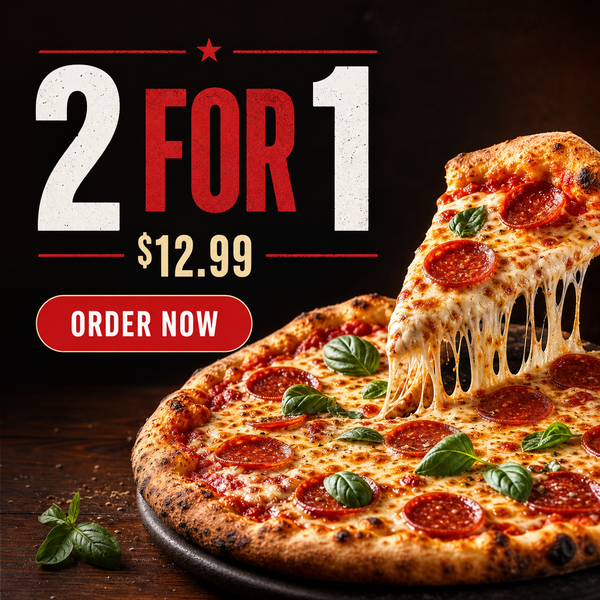
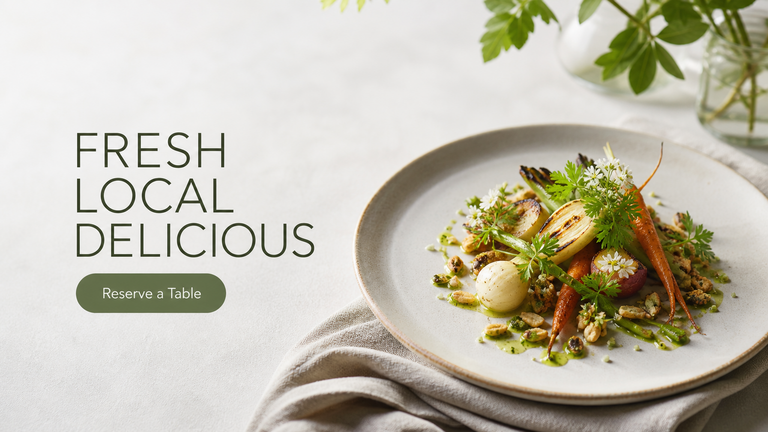
The Facebook Ad Maker for Restaurants turns a real dish photo into a high-contrast Facebook ad or website hero image — with clean space for your headline and call to action.
Built inside FoodPhoto.ai Studio (marketing mode): upload a real dish photo, pick a preset, and the AI does the styling. Start in FoodPhoto.ai Studio, browse every preset on the Marketing Studio hub, or compare plans on pricing.
Preset previews
These are real FoodPhoto.ai marketing presets. Each one starts from your photo and restyles it for the use case below.
What this maker creates
- Use fb_ad for a scroll-stopping Facebook ad creative or website_hero for a wide hero banner, each leaving an uncluttered area for a headline and CTA.
- The dish stays accurate, which keeps ad creative compliant with 'what you see is what you get' expectations.
- Outputs drop straight into Meta Ads Manager and your site's hero slot.
When restaurants use it
- Running Facebook or Instagram ad campaigns for a promotion or new dish.
- Refreshing a website homepage hero with an appetizing, on-brand image.
- A/B testing several hero images from the same dish photo.
Restaurants running paid social and maintaining a website who need ad and hero creative built from real dishes. Commercial 'ad maker' intent mapped to restaurant Facebook ads and web heroes.
How to make it in the Studio
- Open FoodPhoto.ai Studio and upload a clear photo of your real dish or drink.
- Switch to the marketing presets and select the preset shown above.
- Generate a few options and keep the one that still matches what you serve.
- Add your headline, price, or date in the open space, then export for the channel you need.
The presets are included with paid credits: Starter is $15/mo for 50 credits, and the one-time Menu Test Pack is $10 for 10 credits. One credit makes one finished image.
Related makers
- Restaurant Social Media Post Maker
- Restaurant Instagram Post Maker
- Delivery App Promo Maker (DoorDash & Uber Eats)
- All marketing makers (hub)
- Food photography styles
Frequently asked questions
How do I make a Facebook ad for my restaurant?
Upload a real dish photo in FoodPhoto.ai Studio, open the marketing presets, choose Facebook Ad, and the AI builds an ad creative with clean space for your headline and CTA. Export and upload to Meta Ads Manager.
Can I make a website hero image too?
Yes. The Website Hero preset outputs a wide 16:9 banner with room for a headline and button, ideal for a homepage hero.
Is the food accurate for ads?
Yes. The maker starts from your real plate, so ad creative matches the dish you serve.
How much does it cost?
Starter is $15/mo for 50 credits; the one-time Menu Test Pack is $10 for 10 credits. One credit makes one image.
Make your Facebook Ad graphic
Open FoodPhoto.ai Studio, upload a real photo, and apply the preset. Start with the Menu Test Pack to try it on a few items before committing to a plan.