

Ghost Kitchen Menu Photography: The Complete AI Guide for Delivery-Only Restaurants
A delivery-only kitchen has no dining room or signage. On Uber Eats, DoorDash and Grubhub, the menu thumbnail is the storefront. This guide shows a phone-first workflow to cover a rotating menu and multiple virtual brands without a studio shoot.
Why ghost kitchens live or die by their photos
The ghost kitchen model removes every physical brand touchpoint. No storefront, no ambiance, no staff in branded uniforms. The customer’s entire experience of your brand before placing an order is a grid of menu item photos on Uber Eats, DoorDash, or Grubhub. That makes photo quality not a marketing nice-to-have but a direct revenue lever.
A ghost kitchen removes physical touchpoints. Before ordering, customers see only photos and prices.
Complete, consistent coverage helps customers decide faster than listings with missing or mismatched images. Results vary by menu, market and placement — no order-volume promise is made here. For tracked data we publish, see Food photos that increase orders: data and stats.
Ghost kitchen photo challenges traditional photography cannot solve
Ghost kitchen operators face a set of photography challenges that make traditional photography economically irrational:
- High menu turnover: ghost kitchens rotate menus weekly or monthly to respond to market demand. A $600 photography session cannot be justified for each menu update.
- Multiple virtual brands from one kitchen: many ghost kitchen operators run 3–8 virtual brands from a single location, each requiring a distinct visual identity. Traditional photography for 3 brands means 3 shoots.
- Tight margins: the ghost kitchen model often runs on 15–25% net margins. Traditional photography at $500–$2,000 per session represents 20–30% of monthly profit for smaller operators.
- Time pressure: a new menu item launched on Tuesday needs photos live by Wednesday. A 2–3 week photography turnaround is operationally incompatible with that cadence.
- Scale: 40–120 menu items across brands, not the 15–20 of a traditional sit-down restaurant. The per-item cost of traditional photography at that scale is prohibitive.
Delivery app photo requirements for ghost kitchens
Official rules change. Check each merchant help page before upload. Last-verified September 11, 2026 against the merchant guidance cited in our DoorDash guide and delivery specs hub; confirm the limit shown in your own merchant portal.
| Platform | Minimum resolution | Aspect ratio | File size | Key rule |
|---|---|---|---|---|
| DoorDash | 1400×800 px | 16:9 landscape | Under 2MB recommended | No text overlays; food must fill majority of frame |
| Uber Eats | 1250×1000 px | 5:4 | Under 5MB | White or neutral background preferred |
| Grubhub | 800×800 px | 1:1 square | Under 10MB | No watermarks; food-only content |
| Deliveroo | 1200×1200 px | 1:1 square | Under 10MB | Real dish; no stock photos |
| Just Eat | 800×800 px | 1:1 or 4:3 | Under 10MB | Neutral background preferred |
FoodPhoto recommendation: FoodPhoto.ai exports a separate file per platform size so one master is not awkwardly cropped between DoorDash 16:9 and Uber Eats 5:4. Confirm final crop in the merchant dashboard.
The AI workflow for ghost kitchen operators
The complete workflow from raw kitchen photo to live delivery app listing takes under 5 minutes per item:
- Shoot the actual dish with your smartphone. Place it on any clean, uncluttered surface — a white cutting board, a sheet of parchment paper, or a clean countertop. Take 2–3 photos per item in natural light or under a ring light. You do not need a studio setup.
- Upload to FoodPhoto.ai. Choose a cuisine/mood preset and the target delivery platform.
- AI processes the image: background removal and replacement with a neutral delivery-compliant background, lighting correction for kitchen-light color casts, crop to the exact platform specification.
- Download the platform-ready file. Files are named for easy identification (e.g.,
korean-fried-chicken-uber-eats.jpg) and sized correctly for direct upload. - Upload directly to your delivery app merchant dashboard — DoorDash Merchant Portal, Uber Eats Restaurant Dashboard, or Grubhub for Restaurants.
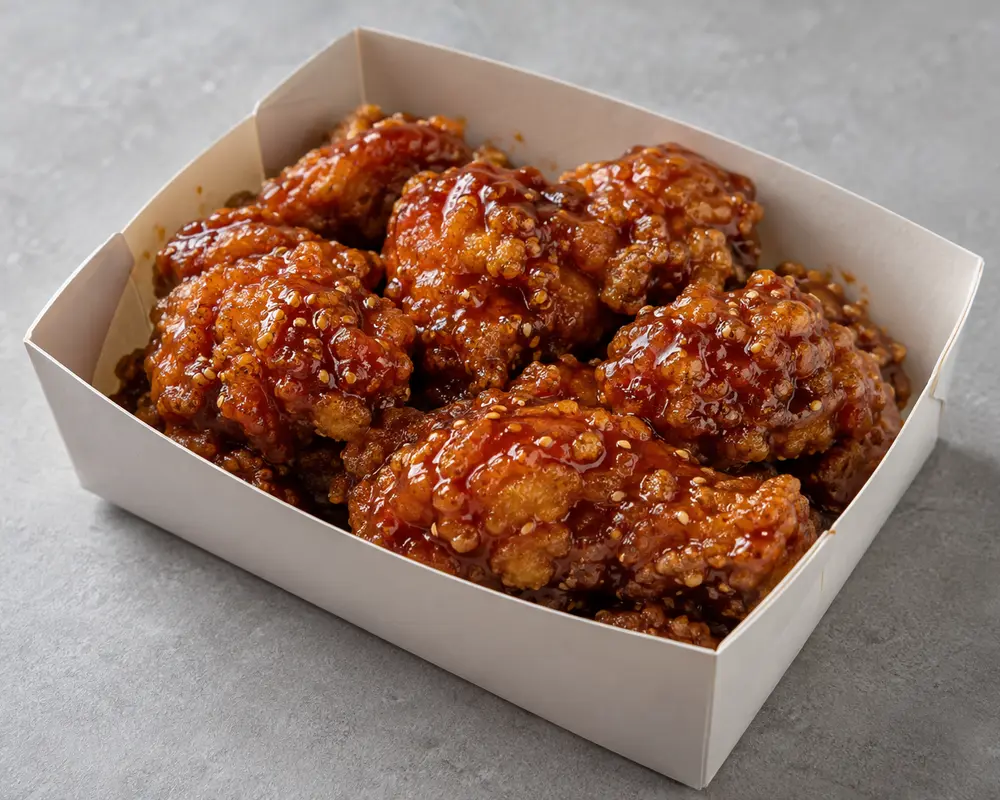
Editable prompt for this example (copy into Studio)
Subject: glazed Korean fried chicken in delivery container, same modest real portion, no extra props
Composition: centered, food fills 70% of frame, no text, no hands, no people
Lighting: soft daylight 5500K, gentle shadow, natural white balance
Viewpoint: 30-degree three-quarter plus overhead clarity, sharp focus on glaze
Background: matte neutral light gray, softly blurred
Constraints: keep real portion and shape, photorealistic, menu-ready, delivery-policy compliant
For a 40-item menu across two virtual brands, this workflow completes in a single afternoon. A photographer-based workflow for the same scope would take 2–4 weeks and cost $1,500–$4,000.
Managing multiple virtual brands with consistent AI presets
Ghost kitchen operators running multiple brands can create distinct visual identities per brand using FoodPhoto.ai’s preset library:
- Italian comfort brand: warm golden tones, rustic wood-grain background preset, slightly softer lighting.
- Korean fusion brand: clean, dark slate background, high contrast, cool-neutral color grading.
- American BBQ brand: warm amber tones, dark background, high-saturation color grading for char and gloss.
- Healthy bowls brand: bright white background, cool-neutral tones, matte finish to emphasize fresh ingredients.
Illustrative examples. Save one configuration per brand so new items match. Seasonal rotations reuse the same setting.
Cost analysis: ghost kitchen photography budget
| Approach | Annual cost (80-item menu, 3 brands) | Time per item update |
|---|---|---|
| Traditional photography (3 sessions/year) | $3,000–$6,000 observed example | 2–4 weeks |
| FoodPhoto.ai Growth | See current plans and usage estimates | Under 5 minutes per item |
| FoodPhoto.ai Studio | See current plans and usage estimates | Under 5 minutes per item |
See current plans and usage estimates for the monthly allowance. The workflow estimate remains under 5 minutes per item. Open the workflow in FoodPhoto Studio or compare delivery specs by platform.
Getting started: your first ghost kitchen photo batch
Pre-shoot checklist
- Clean a white surface (cutting board, foam board, or countertop) — this is your temporary studio.
- Shoot near a window with indirect natural light, or set up a ring light 18–24 inches from the dish at a 45-degree angle.
- Plate the dish exactly as it is delivered to the customer — including standard packaging for delivery items.
- Shoot your 10 best-selling items first — they drive approximately 80% of revenue and will show the fastest ROI on improved photos.
- Take 3 photos per item at slightly different angles (overhead, 30-degree, 45-degree) so you can choose the best composition for each platform.
Start with your best sellers in FoodPhoto Studio. Two free photos with a verified account, without a card. See the current plans and usage estimates for photos, menus and campaigns.
Frequently asked questions
How do ghost kitchens get food photos without a dining room or studio?
Ghost kitchen operators use AI food photo enhancement tools like FoodPhoto.ai to turn smartphone photos of real dishes into delivery-app-ready images with neutral backgrounds and correct platform dimensions — without a photographer or studio. A ring light, clean surface, smartphone are sufficient input.
Can I run multiple virtual brands with different visual styles from one AI tool?
Yes. Save one preset per brand to create distinct visual identities — warm Italian tones for one brand, clean Korean-fusion aesthetic for another — while keeping delivery spec compliance. Save a preset configuration per brand and every new item matches the established visual identity automatically.
What delivery app photo requirements apply to ghost kitchens?
Ghost kitchens must meet the same requirements as any restaurant on each platform. DoorDash 16:9 1400x800px minimum; Uber Eats 5:4 1250x1000px minimum per current text — verify on official pages. FoodPhoto.ai exports per-platform sizes.
Is AI food photography allowed on DoorDash and Uber Eats for ghost kitchens?
Yes, with one condition: photo must show the actual dish received. FoodPhoto.ai enhances a real phone photo — lighting, background, crop — without inventing food.
Sources & last-verified
Delivery specs: DoorDash Merchant, Uber Eats Restaurant, Grubhub, Deliveroo, Just Eat help pages — check each merchant help page before upload and confirm the limit shown in your own portal. Market estimates withheld — no primary source verified. Revision: 2026-06-24 published, 2026-07-22 modified, 2026-09-11 removed uncited 38%/50% claims. See also Ghost kitchen photography: how delivery-only brands win on the apps.